30 Minute Audit: Make Shopify Visual Merchandising an Operating System
A Shopify-first, operational approach to visual merchandising. Start with a 30 minute audit, follow a 30 day plan, and fix search and pinning before...

30 Minute Audit: Make Shopify Visual Merchandising an Operating System
The highest-leverage move for most Shopify merchants is stacking three things at once: rule-based collection ordering, tuned site search, and consistent product cards. Together they shape what shoppers see in the first three seconds. Start with a 30-minute audit of your top five collections and pin your best-selling SKUs to the top today, before touching any app.
TL;DR:
- Pin your top three selling products to the top of high-traffic collections using velocity data from the past 30 days to maximize initial impact.
- Standardize image aspect ratios across your top 20 products to build trust and consistency in product cards, positively influencing shopper perception.
- Build collection sort rules that combine sales velocity, current inventory, and margin, rather than relying solely on default best-seller logic.
- Use accurate, inventory-linked badges such as low stock or bestseller to create urgency without misleading shoppers, and check their accuracy weekly.
- Prioritize search optimization by auditing common queries for zero results or synonym gaps, and consider AI-powered search tools to improve relevancy and semantic matching.
Table of Contents
- What Is Shopify Visual Merchandising, and Where Do You Start?
- Quick Visual Merchandising Checklist: One-Day to One-Week Actions
- Collection Page Merchandising: Rules, Pinning, and Guardrails
- Product Card and Product Page Visual Rules
- Search & Discovery as a Merchandising Surface
- Badges, Labels, and Urgency Rules That Keep Trust
- Personalization and AI: What to Automate, What to Keep Manual
- Measure, Iterate, and Set a Refresh Cadence
- Choosing Merchandising Apps: A Buyer’s Checklist
- Your 30-Day Merchandising Playbook
- Merchandising as an Operating System, Not a Design Task
- Get a Free Shopify Search Audit From Indexa
- Sources
- FAQ
What Is Shopify Visual Merchandising, and Where Do You Start?
Shopify visual merchandising is the practice of arranging product images, layouts, collection order, and on-page signals so shoppers find and buy the right products faster. Shopify’s own visual merchandising guide frames it as designing displays that attract attention and drive purchases, whether that’s a homepage banner or the sort order on a collection page. The term covers a lot of ground: image standards, badge design, search results, and how personalization engines decide what to show which shopper.
Most merchants treat it as a design task. It’s actually an operations task. Your product images, your collection sort logic, and your search results engine all pull from the same inventory and sales data, and they all need to agree with each other. When they don’t, a shopper sees an out-of-stock hero product, clicks it, and bounces.
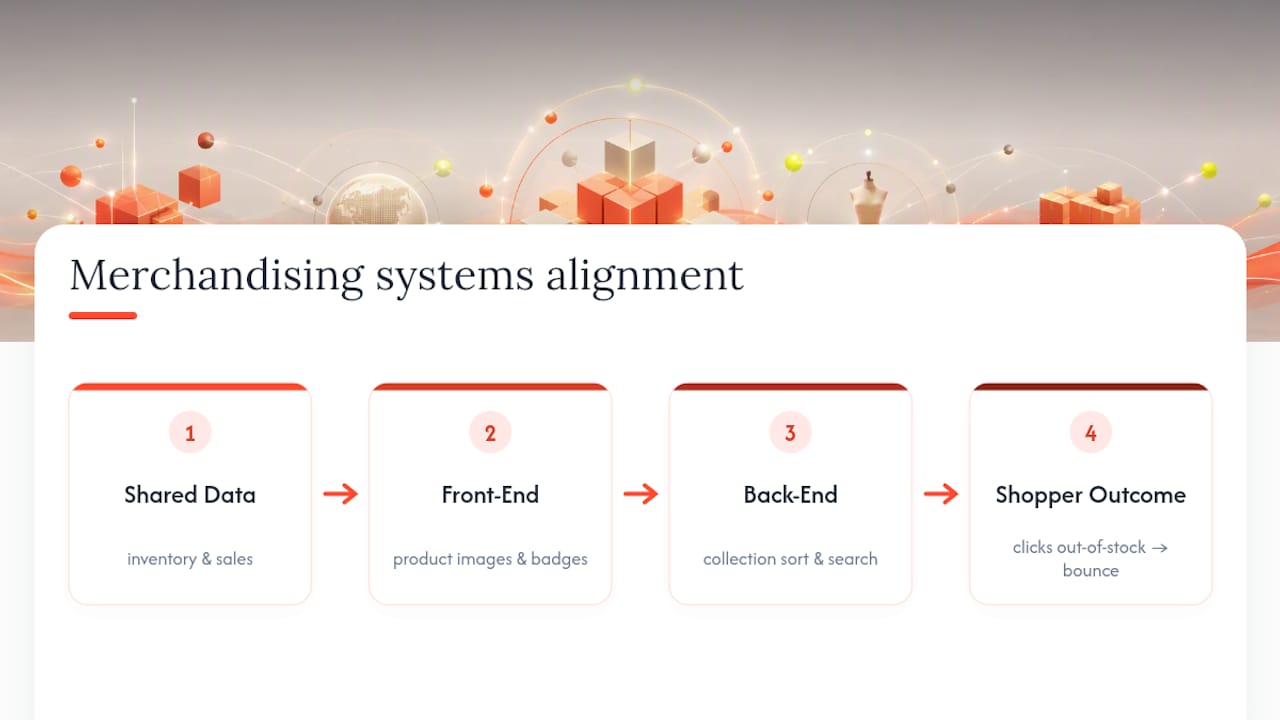
Here’s the quickest way to start: pick your five highest-traffic collections, sort by conversion rate for the last 30 days, and check whether your current display order matches that data. It usually doesn’t. That gap is your starting checklist.
Quick Visual Merchandising Checklist: One-Day to One-Week Actions
Not every fix requires a developer or a new app subscription. Some of the highest-impact changes take an afternoon.
Do these today:
- Pin your top three hero SKUs (by 30-day sales velocity) to the top of your best-selling collections.
- Standardize image crops across your top 20 products so every card uses the same aspect ratio.
- Add one accurate, inventory-linked urgency badge (low stock or bestseller) to a single high-traffic collection.
Do these this week: 4. Build a collection sort rule that blends sales velocity, margin, and current stock instead of relying on Shopify’s default “best selling” logic. 5. Run a search synonym audit, checking your top 50 queries against what actually returns. 6. Rework product images for your ten highest-traffic SKUs to match a consistent lighting and background standard.
Keep doing these ongoing:
Collection Page Merchandising: Rules, Pinning, and Guardrails
Shopify’s native “best selling” and “manual” sort options are blunt instruments. A product can sit at the top of a collection because it sold well two years ago, even if it’s now backordered. Real merchandising rules blend multiple signals at once: sales velocity, margin, current inventory, seasonality, and manual pins for campaign products.
The strongest setups work like this:
- Pin two to four hero SKUs manually at the very top of each key collection, refreshed on a schedule.
- Let an automated rule rank everything below that by a weighted mix of recent sales and inventory health.
- Build a guardrail that automatically excludes any product below a stock threshold, or one flagged for missing or low-quality images, from the top 12 positions.
- Re-run the rule at least weekly so a hot product doesn’t sit buried for days while the collection page still shows last month’s winners.
One gotcha catches a lot of merchants off guard: your theme’s own sort settings can silently override an app’s ordering if the two aren’t wired together correctly. Category reviews of collection-sorting apps note that the reliable ones write sort order back through the Shopify API rather than injecting a front-end script that reorders products after the page loads. Ask directly, before you install anything, which method a tool uses.
Pro Tip: Before you commit to a new sorting rule, screenshot your top three collections, apply the change, and compare add-to-cart rate for the same collections seven days later. If it doesn’t move, the rule isn’t the problem, your product mix probably is.
Product Card and Product Page Visual Rules
Consistency beats cleverness here. A shopper scanning a collection page decides in under a second whether a product card looks trustworthy, and mismatched crops or lighting kill that trust instantly.
Build your product media around a simple system:
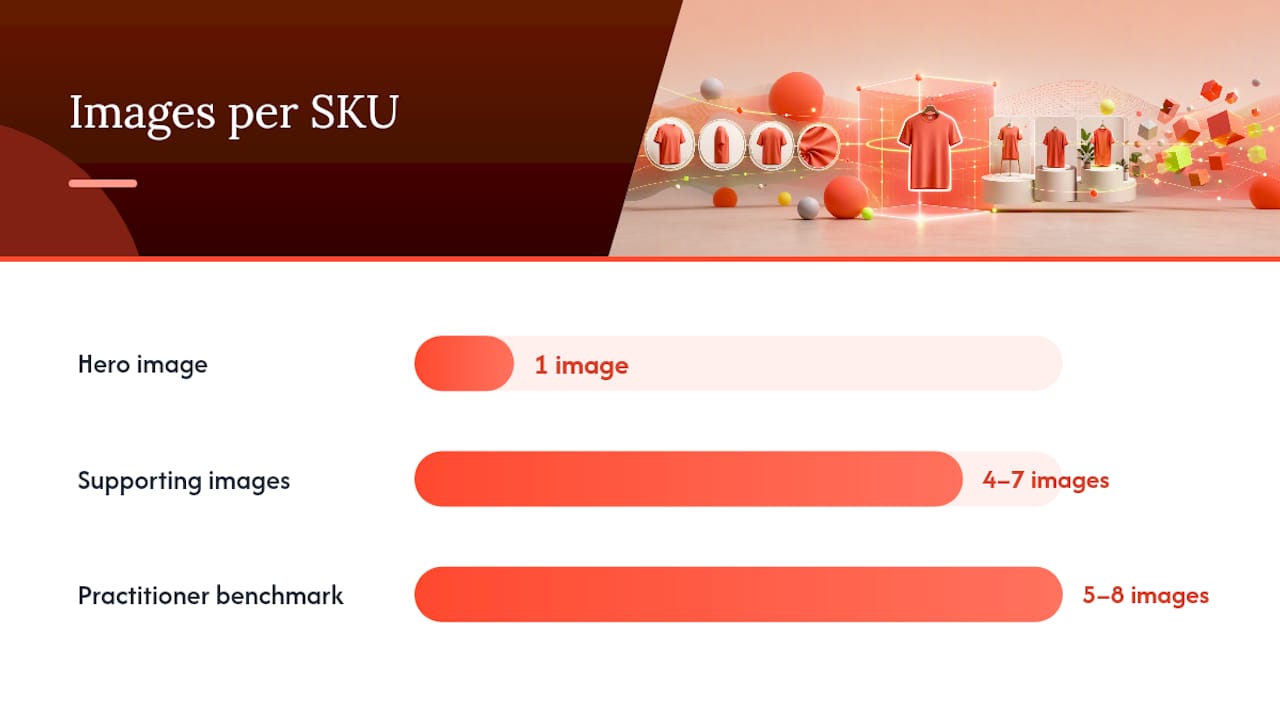
- One hero image that shows the full product on a clean, consistent background, matching every other hero image in the same collection.
- Four to seven supporting images, including at least one lifestyle or in-use shot and one detail close-up. Practitioner benchmarks suggest five to eight images per SKU as the range that supports scanning without overwhelming the page.
- An optional 15 to 30-second product video for higher-consideration items, where it genuinely shows something a static image can’t.
- A fixed aspect ratio across the store, either 1:1 or 4:5, so cards never jump in height as a shopper scrolls.
On the card itself, keep price visible without a click, place badges in the same corner every time, show color or size swatches where relevant, and make sure “quick add” doesn’t skip a required variant choice. Shopify’s own developer documentation on product templates notes that product media should update automatically when a shopper selects a different variant, and that variant deep-linking, letting a shared link land directly on the right color or size, is a detail worth testing on your theme before launch. Since mobile traffic dominates most Shopify stores, test every one of these rules on a 375-pixel-wide screen before calling it done.
Search & Discovery as a Merchandising Surface
Most merchants treat search as a utility bar and merchandising as a homepage problem. That’s backward. A shopper who types into your search box has already told you exactly what they want, and search results are one of the highest-intent surfaces on your entire site. Search-driven visitors convert at meaningfully higher rates than shoppers browsing collections cold, which makes a poorly tuned search box one of the most expensive blind spots in a Shopify store.
Pro Tip: A quick way to feel the pain here yourself: search your own store for a product using a common typo, a plural instead of singular, or a slang term a customer might use. If you get zero results, so does your shopper, and they don’t complain, they just leave.
Run this audit before you touch anything else:
- Pull your last 30 days of search queries and flag every one that returned zero results.
- Find high-volume queries with unusually low click-through rates. That’s a ranking problem, not a demand problem.
- Check for synonym gaps: are customers searching “hoodie” while your product titles only say “pullover”?
- Confirm whether any top queries are returning out-of-stock products in the top three results.
A managed AI search layer helps close these gaps by handling typo tolerance and semantic matching automatically, and by tuning continuously as new queries come in, rather than requiring a manual synonym list update every month. If you want a structured way to run this audit, Indexa’s free Shopify search audit walks through exactly these checks, and the downloadable checklist is worth keeping next to your collection sort rules as a companion reference.
Badges, Labels, and Urgency Rules That Keep Trust
Badges work because they compress information into a glance. They also backfire fast when they’re wrong. A “low stock” badge on a product that’s actually sitting at 400 units is the kind of thing that trains shoppers to ignore every badge on your site.
Group your badges into three honest categories: urgency (“only 3 left,” tied to a live inventory count), social proof (“bestseller,” tied to a rolling sales window), and clarity (“new arrival,” tied to a listing date). Each one needs a hard rule behind it, not a designer’s judgment call.
- Set urgency badges to trigger automatically off a real inventory threshold, synced in near real time, never hand-entered.
- If you use countdown timers for promotions, tie them to the actual promotion end time in your system, not a static graphic.
- Spot-check ten random badges weekly against live inventory to catch drift before a customer does.
- Track conversion lift on the specific collection where you test a new badge, and roll it back if lift doesn’t show within two weeks.
A single, well-placed urgency badge on a high-traffic collection is one of the fastest experiments to run with measurable results, largely because the sample size fills in quickly.
Personalization and AI: What to Automate, What to Keep Manual
The safest pattern is simple: set your business rules first, then let personalization operate inside them. Decide which products are pinned, which collections are running a campaign, and which SKUs are off-limits for promotion, before any algorithm touches the page.
- Lock your manual pins and campaign products as fixed positions that AI ranking cannot override.
- Let personalization work with signals it’s genuinely good at: browsing behavior, device type, current stock, and shopper geography.
- Keep it away from signals it handles poorly, like promoting a one-off, low-quality SKU just because a single shopper viewed it twice.
- Run an A/B test on one collection at a time, holding a control group on the old logic while personalization runs on the test group.
- Watch add-to-cart rate and conversion rate by collection as your primary validation metrics, not just page views.
Treat every personalization change as a hypothesis, not a permanent fix, until the numbers back it up over at least two full weeks.
Measure, Iterate, and Set a Refresh Cadence
None of this matters without a way to tell if it’s working. Five metrics cover almost everything a merchandising change touches: click-through rate from collection to product page, add-to-cart rate by collection, conversion rate by landing page, search conversion rate, and average order value.
A minimal dashboard doesn’t need a data team. Shopify’s native analytics plus a spreadsheet pulling weekly exports covers most stores under seven figures in revenue.
| Element | Recommended cadence |
|---|---|
| Hero product refresh | Every 2 to 3 weeks |
| Featured collections | Every 4 to 6 weeks |
| Seasonal rotations | Quarterly |
| Badge accuracy check | Weekly |
| Search synonym review | Monthly |
Cadence matters more than most merchants assume. Shopify’s own guidance points to regular rotation as one of the simplest ways to keep a store from looking stale, and a stale hero image is one of the quietest conversion killers on any collection page.
Choosing Merchandising Apps: A Buyer’s Checklist
Before you add another app to your Shopify admin, know which category actually solves your problem. The main categories are collection sorters, search and discovery engines, badge and label tools, image quality checkers, personalization engines, and analytics connectors. Most stores need two or three of these, not all six.
Run any candidate through this checklist before you install it:
- Does it write sort order through the Shopify API, or does it reorder products with a front-end script after the page loads? The former is more reliable and won’t fight your theme.
- Can you manually pin, push, or pull specific products regardless of what the automated rule says?
- Does it surface its own analytics, or do you need a separate tool to see whether it’s working?
- What’s the measurable impact on page load speed, tested on mobile, not just desktop?
- Is pricing usage-based, flat monthly, or tiered by catalog size, and does the support model match your team’s technical depth?
Pilot any new tool on two collections for two weeks before rolling it store-wide. Confirm your theme’s own sort settings haven’t quietly overridden the app, and watch load speed and conversion side by side before you commit.
Your 30-Day Merchandising Playbook
This runs in seven steps across four weeks, with clear owners at each stage.
- Week 1: Assign owners (merchandising, operations, a developer for API work) and run the full collection and search audit.
- Week 1: Fix the highest-impact image and product card issues on your top ten SKUs.
- Week 1: Pin hero products across your top five collections.
- Week 2: Implement one inventory-synced badge rule on a high-traffic collection.
- Week 2 to 3: Pilot rule-based sorting on two collections, watching add-to-cart rate daily.
- Week 4: Measure results against your baseline; pass criteria is a measurable lift in click-through or add-to-cart rate.
- Week 4: Roll out what worked to the rest of the catalog, and archive what didn’t.
Escalate to your developer immediately if any change breaks variant deep-linking or slows page load, both are signs the sort logic is fighting your theme rather than working with it.
Merchandising as an Operating System, Not a Design Task
Most merchants treat visual merchandising as something they fix once and revisit during a redesign. That’s the wrong model. Merchandising is tied directly to product data, live inventory, and conversion rate optimization, which means it breaks the moment any of those three drift out of sync with what’s on the page.
The store owners who get this right stop asking “does this look good” and start asking “does this match what’s actually selling and in stock right now.” That single shift in framing, treating the storefront as a live system rather than a static layout, is the real unlock behind most of the tactics in this playbook.
— Barikreativa
Get a Free Shopify Search Audit From Indexa
Every tactic above depends on shoppers actually finding the products you’ve merchandised. If your search box can’t handle a typo, a plural, or a shopper’s natural phrasing, none of your collection sorting or badge work gets seen. There are fully managed AI-driven search and discovery services for Shopify stores that handle typo-tolerant and semantic queries without any setup work on your end.

The merchandising controls inside Indexa let you apply the same pinning and ranking rules covered above directly to search results, so your search surface stays consistent with your collection pages instead of running on separate logic. Such services can tune continuously against your real store data rather than requiring manual synonym updates every month.
If you want to see where your own search is losing shoppers, start with the free Shopify search audit or grab the free search audit checklist and run it against your top 50 queries this week.
Sources
- Visual Merchandising: Tips, Types & Examples - Shopify
- Visual Merchandising: 7 Powerful Strategies to Boost Sales - PIELab
- Best Shopify collection sorting apps 2026: ranked - Craftshift
- Mobile commerce worldwide - Statista
FAQ
What Is the Fastest Shopify Visual Merchandising Fix?
Pin your best-selling SKUs to the top of your highest-traffic collections and standardize image crops across your top 20 products. Both take under a day and require no new app.
How Often Should I Refresh Collection Images?
Rotate hero products every two to three weeks, refresh featured collections every four to six weeks, and handle seasonal layouts quarterly, per Shopify’s own merchandising guidance.
Should Sorting Apps Write Through the Shopify API or Use a Script?
Choose apps that write sort order through the Shopify API. Category reviews show front-end reordering scripts can conflict with theme settings and hurt page speed.
Is Site Search Really Part of Visual Merchandising?
Yes. Search results are a high-intent surface where badges, images, and ranking rules matter just as much as they do on a collection page, and a tool like Indexa can apply the same merchandising logic there.
What Metrics Should I Track First?
Start with collection click-through rate to product pages and add-to-cart rate by collection. Both react quickly to sorting and image changes, making them the clearest early signal.
Recommended
Make discovery work harder.
See what your Shopify search could do better with a free, hands-on audit.
Get your free search audit