Developers: Avoid Layout Shift in Shopify Product Recommendations
Developer focused guide to implement Shopify product recommendations: add and fetch blocks, prevent layout shift, and measure CTR and AOV.
Developers: Avoid Layout Shift in Shopify Product Recommendations
Shopify product recommendations pull related or complementary items onto product pages to lift average order value, and every store already has the backend for it. The fastest first move is checking your product template for a recommendations section, or calling the Product Recommendations API directly if your theme lacks one. From there, the work is customization, placement, and measurement.
TL;DR:
- Use fewer than 10 recommended items per product to avoid decision fatigue, ideally displaying only 2 to 4 choices for better conversion rates.
- Customize recommendations manually via the Search & Discovery app for curated pairings, especially for bundles and high-margin add-ons, rather than relying solely on auto-generated suggestions.
- Ensure recommendation blocks are properly pre-sized, lazy-loaded with placeholders, and placed below the buy box to prevent layout shifts and avoid competing with the primary call to action.
- Track key metrics such as click-through rate, add-to-cart rate, and revenue lift from recommendations to assess and optimize their performance over time.
- Consider using managed AI recommendation services when stores lack engineering resources or require continuous tuning, improving relevance without ongoing manual adjustments.
Table of Contents
- What Shopify’s Built-In Recommendation System Actually Does
- How Do You Add Product Recommendations to a Shopify Theme?
- Customizing Recommendations With Search & Discovery and Metafields
- How Many Product Recommendations Should You Show?
- How Do You Measure Recommendation Performance in Shopify?
- Building an Ongoing Testing Plan for Recommendations
- What Developers Get Wrong About Recommendation Setup
- A Managed Alternative When Recommendations Need Ongoing Tuning
- Where to Verify These Implementation Details
- Sources
What Shopify’s Built-In Recommendation System Actually Does
Shopify runs two distinct recommendation intents, and confusing them is the most common setup mistake. Related recommendations are auto-generated by Shopify’s model, pulling from purchase and browsing patterns you don’t control directly. Complementary recommendations are the ones merchants configure manually, usually to pair a specific product with an accessory, refill, or bundle partner, through the Search & Discovery app.
Both intents typically render in the same places: the product info section below the buy box, dedicated blocks further down the product page, or as widgets on collection pages. Theme compatibility varies. Dawn and its derivatives ship with a recommendations section already wired in; older or heavily customized themes may need one built from scratch.
The platform enforces real limits worth knowing before you design around them. The Product Recommendations API returns up to 10 items per call, but Shopify’s own guidance is to show far fewer. Recommendations also exclude:
- Out-of-stock products, unless you override that behavior explicitly
- Gift cards, which never appear in either intent
- Items already sitting in the customer’s cart
Know these boundaries before you start building, because they shape what your JavaScript needs to handle later.
How Do You Add Product Recommendations to a Shopify Theme?
Most themes handle the heavy lifting, but knowing the mechanics matters when a theme is missing the block, or when you want more control over rendering.
- Find or create the recommendations section. In Dawn, this lives at
sections/product-recommendations.liquid. Check for adata-urlattribute built fromroutes.product_recommendations_url, this is the endpoint the section fetches from. - Understand the fetch pattern. The recommendations object is frequently empty on initial page load. Shopify’s own developer docs confirm the complementary products section is meant to be fetched asynchronously, not rendered server-side with the rest of the page.
- Write the JavaScript fetch. Pull the section’s rendered HTML from the URL (which includes
section_id,product_id,intent, andlimitparameters), then swap it into a placeholder container. A basicIntersectionObservershould trigger the fetch only when the block scrolls into view, saving unnecessary API calls on long product pages. - Pre-size the container. Set an explicit height on the placeholder before the fetch resolves. Skipping this step is the single most common cause of layout shift on product pages that use recommendations.
- Write the Liquid loop. Once the section returns, a simple loop over
recommendations.productsrenders each item’s image, title, and price using the same card markup your collection pages already use. - Test before shipping. Check image dimensions render correctly at different card sizes, confirm quick-add buttons still function inside the recommendation grid, and verify the block hides gracefully (not with a broken placeholder) when Shopify returns zero recommendations.
Pro Tip: Test your recommendations block on a product with almost no order history. New or low-traffic SKUs often return sparse related recommendations, and that’s exactly when your fallback UI needs to hold up instead of showing an empty box.
Customizing Recommendations With Search & Discovery and Metafields
Manual control lives in the Search & Discovery app, and it’s where most merchandising decisions actually happen. Adding a complementary product to a specific item takes a few clicks: open the product, add up to 10 complementary or related picks, and preview exactly how Shopify’s auto-generated suggestions would have filled that slot otherwise.
That preview matters more than it sounds. Shopify lets you choose whether manual picks fully replace the auto-generated related recommendations or combine with them, and the Search & Discovery settings control that behavior per product.
A few practical notes for anyone managing more than a handful of SKUs:
- Bulk editing through metafields is far faster than clicking through products one at a time when you need to set recommendations catalog-wide.
- Auto-generated related picks are effectively a black box. If you need to exclude a discontinued line or a competitor’s product that keeps surfacing, filter client-side or override it with manual picks in Search & Discovery.
- Manual complementary recommendations tend to work best for curated pairings, like bundles and high-margin add-ons, while auto-generated related picks are better suited to broad discovery.
How Many Product Recommendations Should You Show?
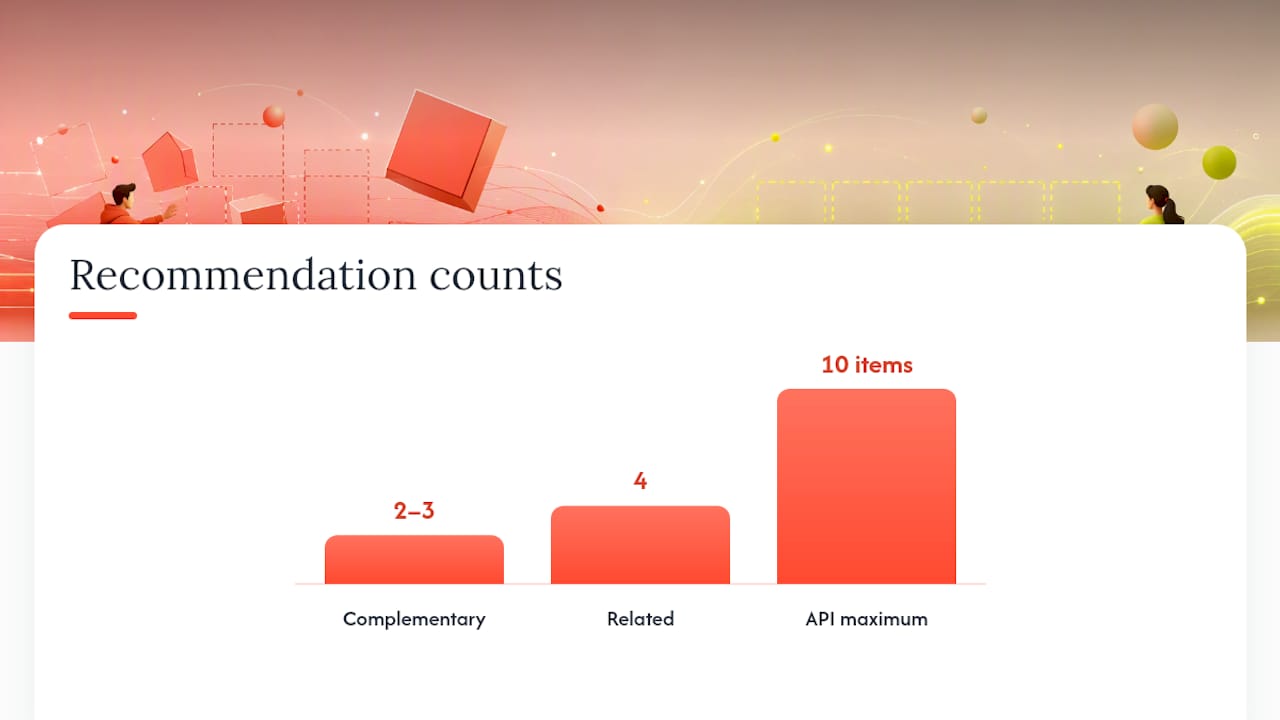
Fewer choices convert better here, consistently. Shopify’s own guidance backs a default of 2 to 3 items for complementary recommendations and around 4 for related, even though the API can return up to 10. Showing all 10 doesn’t drive more upsells, it just adds scroll and decision fatigue.
Copy matters more than most merchants assume. Label complementary blocks with something like “Pairs well with” and related blocks with “You might also like.” The distinction tells shoppers whether they’re looking at a curated pairing or a broader browsing suggestion, and that framing changes click behavior.
A few more rules worth following by default:
- Place recommendations below the buy box, not above it. Never let them compete with the primary add-to-cart action.
- Size card images consistently and lazy-load them with a skeleton placeholder so the layout doesn’t jump as they populate.
- Enable quick-add buttons on recommendation cards when your theme supports them. Forcing a full page load just to add a suggested item kills momentum.
- Never surface out-of-stock or soon-to-be-discontinued items in the recommendation grid, even if Shopify’s algorithm suggests them.
- Rotate seasonal or high-margin SKUs into complementary slots manually rather than relying entirely on the auto-generated picks.
Pro Tip: If you sell bundles or kits, hardcode those pairings as complementary recommendations instead of trusting the auto-generated related engine to find them. Related recommendations optimize for broad discovery, not your specific margin math.
How Do You Measure Recommendation Performance in Shopify?
Track four numbers before you touch anything else: click-through rate on the recommendation block, add-to-cart rate from those clicks, conversion rate on sessions that engaged with a recommendation, and the resulting lift in average order value. Without a baseline on all four, you can’t tell if a design change actually helped.
Shopify surfaces some of this natively. The behavior reports in Shopify Analytics include a recommendation conversion view that tracks performance over time, giving you a starting point without custom instrumentation.
For anything more granular, you’ll want your own event tracking:
- Fire a custom event on recommendation impression, not just on click, so you can calculate true CTR rather than just raw click counts.
- Use the API’s product URL format consistently so attribution doesn’t break when a shopper clicks through and later converts.
- Add UTM parameters if you’re running cross-channel comparisons, like testing whether email-driven traffic engages with recommendations differently than organic.
Shopify’s own engineering team has measured online lifts from recommendation model improvements, including a 0.94% relative increase in Shop orders and a 5% jump in high-quality click-through rate during internal A/B tests. Those numbers came from platform-level model changes, not theme tweaks, but they show the ceiling is real when the underlying recommendation logic improves.
Building an Ongoing Testing Plan for Recommendations
Treat recommendations as a permanent testing surface, not a one-time setup task. A few experiments consistently move the needle:
- Swap intent types on a subset of products, related versus complementary, and compare conversion over a full sales cycle.
- Test showing 2 items against showing 4 on the same template to see whether more choice helps or just adds noise.
- Change header copy between “Pairs well with” and “Frequently bought together” and measure click-through differences.
- Compare quick-add buttons against simple link-throughs to the product page.
Shopify’s shift toward a sequence-based generative recommender is worth watching closely. It models buyer sessions as sequences rather than isolated events, which means recommendations increasingly reflect what a shopper did five minutes ago, not just their purchase history. Merchants without engineering bandwidth to chase this kind of personalization, or those running complex catalogs where manual tuning is unrealistic, are the clearest candidates for a managed service instead of in-house iteration.
What Developers Get Wrong About Recommendation Setup
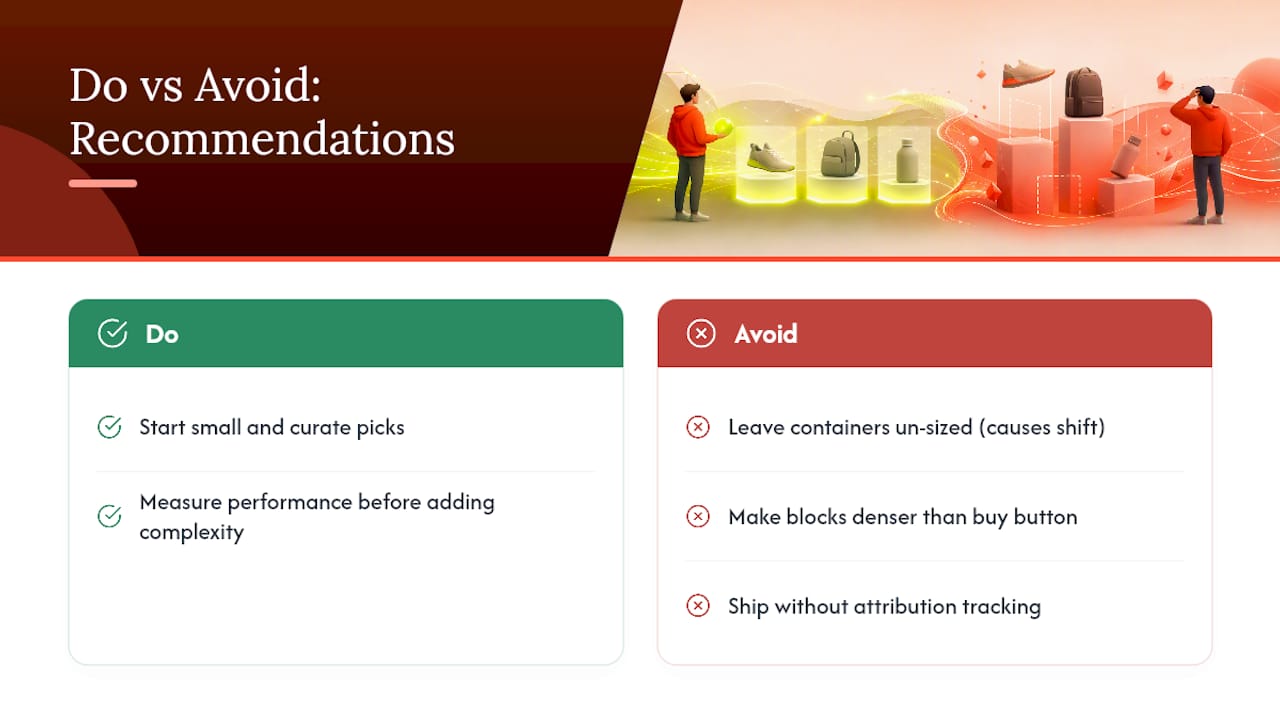
The highest-leverage move is starting small: enable a modest, well-curated set of complementary picks and measure before adding complexity. Most teams skip straight to elaborate personalization and never establish whether the basic block even worked.
The recurring traps are consistent across projects: containers that aren’t pre-sized (causing layout shift the moment recommendations load), recommendation blocks so dense they compete with the actual buy button, and zero attribution tracking, so nobody can say afterward whether the feature earned its shelf space.
— Barikreativa
A Managed Alternative When Recommendations Need Ongoing Tuning
Not every store has a developer on standby to rebuild recommendation logic every quarter, and Shopify’s native tools stop short of continuous tuning based on your actual sales patterns. There are fully managed AI search and discovery services built specifically for Shopify, layering typo-tolerant, semantic query understanding on top of merchandising consoles that adjust recommendation and search relevance as catalogs change.

Such services fit stores with complex catalogs, limited engineering time, or a track record of shoppers bouncing after a failed search, since a broken search experience quietly drags recommendation performance down with it. These services usually require minimal setup effort, and tuning can continue in the background rather than depending on merchant teams to run experiments. If you’re weighing whether native Search & Discovery is enough or you need something that keeps improving on its own, start with a look at how Indexa compares as a managed AI upgrade to Shopify’s built-in tools, or request a free search audit to see where your current setup is leaving revenue on the table.
Where to Verify These Implementation Details
For the exact API parameters and code samples referenced above, check Shopify’s own recommendations documentation and the Dawn theme source. Confirm API version compatibility before deploying.
Sources
- Complementary products
- The generative recommender behind Shopify’s commerce engine
- Customize product recommendations with Shopify Search & Discovery
Recommended
Make discovery work harder.
See what your Shopify search could do better with a free, hands-on audit.
Get your free search audit