Add 2 to 3 Quick Adds to Improve Shopify Cross Sell Recommendations in One Week
Start with native recommendations and 2 to 3 quick adds, run a one week test, then use Search & Discovery or a managed service to lift AOV.

Add 2 to 3 Quick Adds to Improve Shopify Cross Sell Recommendations in One Week
Use Shopify’s Product Recommendations API for the long tail and configure complementary pairings for your best-selling SKUs, then place 2 to 3 quick-add items in the cart drawer. That combination lifts average order value with the least engineering effort. Watch add-to-cart rate on recommended items for one week before you touch anything else. If results stay flat, a managed service like Indexa can retune relevance without pulling your team off other work.
TL;DR:
- Proper placement of recommendations on product pages and in cart drawers enhances visibility and engagement, with the drawer being ideal for quick-add items just before checkout.
- Shopify’s related engine depends on purchase data, while complementary recommendations require manual configuration for top SKUs to ensure relevance and avoid ineffective suggestions.
- Recommendations exclude non-purchasable items, out-of-stock products, gift cards, and items already in the cart, which explains why some suggestions may be empty or irrelevant.
- A well-executed cross-sell strategy focuses on relevance over volume, labeling relationships clearly, and using one-click add-to-cart links to boost conversion rates.
- For stores with limited resources or stagnating results, a managed service like Indexa offers ongoing relevance tuning based on shopper behavior, saving time and improving performance.
Table of Contents
- How Shopify Product Recommendations Work
- Where to Place Cross-Sell Recommendations
- Setup Options for Shopify Cross-Sell Recommendations
- Best Practices for Effective Shopify Cross-Sells
- How to Measure Cross-Sell Performance
- Troubleshooting Empty or Irrelevant Recommendations
- When a Managed Search & Discovery Service Makes Sense
- How Cross-Sells Shape Customer Experience and Brand Perception
- Personalizing Cross-Sells With Customer Data
- Connecting Cross-Sells to Email and Marketing Automation
- Privacy and Legal Considerations for Data-Driven Cross-Sells
- Author Perspective: Your Next 7 Days
- Get a Managed Recommendation Setup Without the Guesswork
- Sources
- FAQ
How Shopify Product Recommendations Work
Shopify runs cross-sells on two distinct engines, and confusing them is the most common setup mistake merchants make, as explained in Shopify SEO Automation. The first is “related,” an algorithmic recommendation built from purchase history, product descriptions, and collection data. The second is “complementary,” a manual pairing you configure yourself through Shopify’s Search & Discovery app. Related recommendations scale automatically across your whole catalog. Complementary pairings give you editorial control over specific products, which matters most for your top sellers, where a bad suggestion costs real revenue.
Both run through the Product Recommendations API, which accepts an intent parameter (either related or complementary), a product_id, and a limit that caps results between 1 and 10. When a product has thin order history or no manually configured pairing, the related engine can return a short or empty array. That is not a bug. It is Shopify telling you the data behind that SKU is not rich enough yet to recommend with confidence.
A few platform-level eligibility rules explain most of the “why is this empty” tickets merchants file:
- The product must be published to the Online Store sales channel.
- Price must be greater than $0. Free or $0 line items get excluded automatically.
- Gift cards are always excluded from recommendation results.
- The product needs available inventory or must allow overselling to appear as purchasable.
- Items already sitting in the customer’s cart are filtered out of the returned set.
If you understand these five rules, you will solve most “recommendations aren’t showing” complaints without opening a support ticket.
Where to Place Cross-Sell Recommendations
Placement decides whether a shopper ever sees your cross-sell, let alone acts on it. Three spots do almost all the work: the product page, the cart (drawer or full page), and post-purchase.
Product page placement works because the shopper is already in a research mindset. A simple heading like “Pairs well with” under the buy box, showing 2 to 3 items, tends to outperform generic labels like “You may also like,” because it states the relationship instead of leaving the shopper to guess it.
Cart drawer versus cart page is where most merchants get stuck choosing. The drawer keeps the shopper in flow, since it slides open without a full navigation event, but it has limited vertical space, so anything beyond 2 items feels cramped. The full cart page gives you more room and works well for stores with longer, more considered checkouts. If you are only building one placement first, start with the drawer. It captures the moment right before checkout, when the shopper has already committed to buying something.
Post-purchase placements (thank-you page, order confirmation email) convert at a lower rate immediately, since the sale is already closed, but they carry no risk of derailing the primary purchase. They work best for low-stakes add-ons and as a bridge into a follow-up email sequence a few days later.
- Product page: builds consideration, low pressure, good for accessories and bundles.
- Cart drawer: highest-intent moment, space-constrained, best for 2 quick-add items.
- Cart page: more room for detail, good for stores with multi-item carts.
- Post-purchase: lower conversion, zero checkout risk, feeds email remarketing.
Setup Options for Shopify Cross-Sell Recommendations
You have four realistic paths, and the right one depends on your store size and how much developer time you have on hand.
- Native theme toggles. Most Shopify 2.0 themes ship with a recommendations section already wired to the Product Recommendations API. Turning it on for product pages usually takes minutes and costs nothing. This is the fastest path for a store with limited technical resources.
- Search & Discovery complementary pairings. Log into the app, pick a product, and manually assign 2 to 4 complementary items. This is worth the manual effort specifically for your top 10 to 20 revenue-driving SKUs, where a generic algorithmic match risks recommending something irrelevant. Stores under roughly 100 orders benefit especially, since Shopify’s related algorithm needs order history to be accurate and simply has not had time to learn your catalog yet.
- Third-party apps. Apps add bundle logic, “frequently bought together” widgets, discount stacking, and customer segmentation that native tools don’t offer. The trade-off is added JavaScript weight on every page load, plus a recurring subscription cost, and app-based widgets can measurably slow page speed compared to theme-native Liquid.
- Custom Liquid/JS. Worth the investment when you need variant-aware logic, inventory-sensitive rules, or recommendation behavior tied to custom metafields the native tools don’t expose. The most common pitfall here is fetching raw product data instead of the API’s rendered section response, which breaks the HTML structure your theme expects and creates a maintenance headache down the line.
Pro Tip: Before you build anything custom, duplicate your live theme and test the recommendation logic against edge cases: subscriptions, out-of-stock-but-orderable items, and multi-currency pricing under Shopify Markets. Skipping this step is the single most common reason A/B tests come back with misleading results.
Best Practices for Effective Shopify Cross-Sells
Relevance beats volume every time. Shopify’s own merchandising guidance recommends defaulting to 2 to 3 complementary products with pagination for anything beyond that, because a cluttered cart drawer competes with the checkout button for attention, and that is a fight the checkout button should always win.
A few rules separate cross-sells that convert from ones shoppers ignore or resent:
- Exclude anything already sitting in the cart. Recommending a duplicate reads as sloppy, not helpful.
- Confirm the recommended item has a purchasable variant selected before rendering the add button. A recommendation that fails on click destroys trust fast.
- Label the relationship plainly: “Pairs well with,” “Complete the set,” “Frequently bought together.” Vague labels like “You might like” underperform because they don’t explain why the item is there.
- Use a one-click add that sends the correct variant straight to the cart endpoint. Forcing a shopper to leave the cart to visit a product page usually kills the impulse that made the recommendation work in the first place.
- Reserve manual complementary pairings for hero SKUs; let the related algorithm handle everything else. Trying to hand-pair your entire catalog doesn’t scale and isn’t worth the time.
Pro Tip: Run one variable at a time in your tests. If you change the copy and the item count in the same test, you won’t know which change moved the needle.
How to Measure Cross-Sell Performance
Four numbers tell you whether your cross-sells are earning their space: add-to-cart rate on recommended items, conversion rate of those items through to purchase, revenue directly attributed to recommendations, and the overall lift in average order value.
Shopify makes attribution easier than most merchants realize. The Product Recommendations API embeds tracking parameters directly in recommendation URLs, including pr_choice, pr_prod_strat, pr_rec_pid, pr_ref_pid, and pr_seq. Wire these into your analytics events and you can build a real funnel from impression to click to add-to-cart to purchase, instead of guessing at correlation.
To run a clean test:
- Establish a baseline for one to two weeks with your current setup, whatever that is.
- Change exactly one variable: item count, placement, manual versus algorithmic, or the label copy.
- Run the variant for a comparable traffic period, ideally at least a week to smooth out day-of-week noise.
- Compare add-to-cart rate and AOV lift against the baseline before rolling out the winner store-wide.
A useful benchmark: add-to-cart rates on recommended items in the 3% to 8% range are considered solid performance, with genuinely necessary add-ons (batteries, cases, refills) often landing at the higher end of that range.
Troubleshooting Empty or Irrelevant Recommendations
When recommendations return empty or feel off, work through eligibility first before assuming the algorithm is broken. Check that the product is published to the Online Store channel, priced above $0, not a gift card, and carries available inventory or an overselling allowance.
- Call the Product Recommendations API endpoint directly for the affected product ID and inspect the raw response before blaming your theme code.
- Test any change on a duplicate theme first, never on the live storefront, since a broken recommendation section can quietly suppress add-to-cart clicks for days before anyone notices.
- Verify the add-to-cart button on each recommended item targets the correct variant ID, not just the base product. This is the single most common bug in custom implementations.
- If you sell in multiple currencies through Shopify Markets, confirm recommended prices render correctly for each market rather than defaulting to your primary currency.
When a Managed Search & Discovery Service Makes Sense
DIY works well until your catalog outgrows manual pairing or your team runs out of time to keep retuning it. That’s the point where a fully managed option like Indexa earns its cost. Indexa offers typo-tolerant, semantic search and recommendation tuning designed to work on Shopify, with ongoing adjustments based on store behavior rather than a one-time configuration.
It makes the most sense for three situations: your internal team has no spare engineering bandwidth for ongoing Liquid or JS maintenance, you’ve tried native and app-based recommendations and still see weak relevance, or you need to recover measurable revenue lost to shoppers who never find the right product in the first place. Indexa’s recommendation features integrate directly with Shopify storefronts, including Hydrogen builds, so you’re not maintaining a parallel system alongside your theme.
How Cross-Sells Shape Customer Experience and Brand Perception
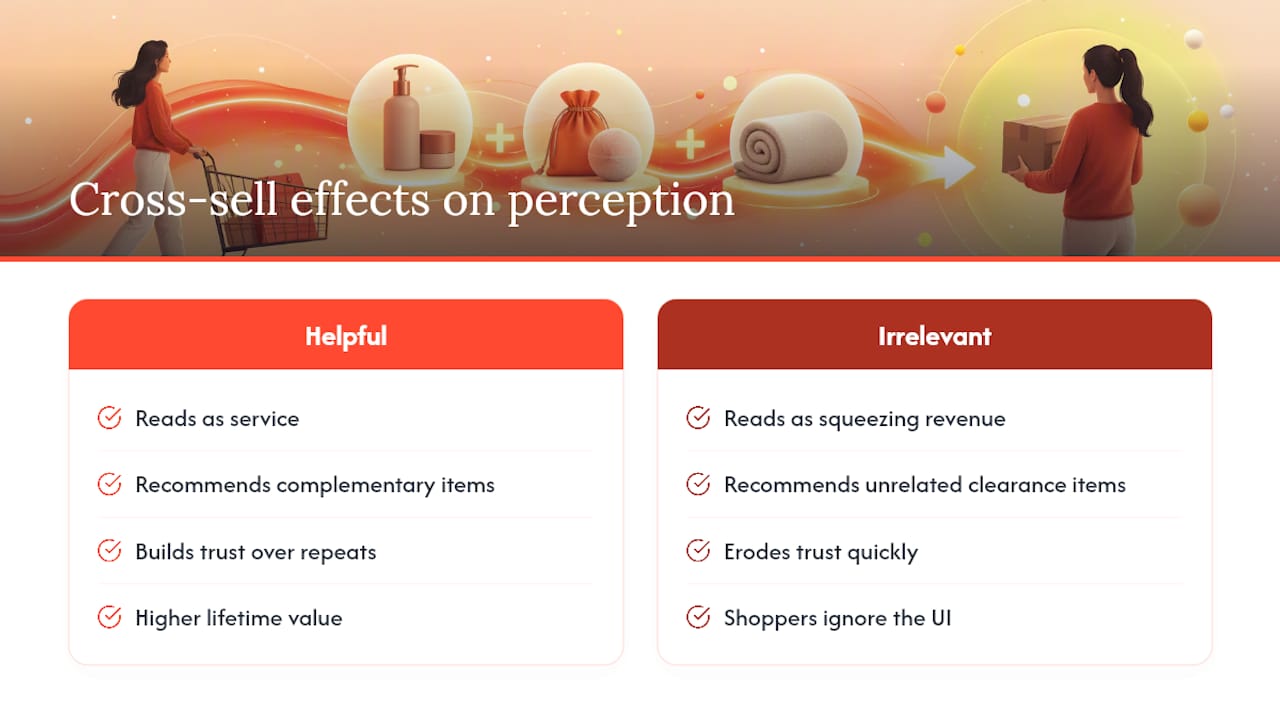
A well-placed cross-sell reads as helpful. A poorly targeted one reads as a store trying to squeeze extra revenue out of every click, and shoppers notice the difference immediately. Recommending a phone case right after someone buys a phone feels like service. Recommending an unrelated clearance item in the same slot feels like noise, and repeated noise erodes trust in every other recommendation your store makes afterward.
This matters more for repeat customers than first-time visitors. A shopper who buys from you twice a year and gets three genuinely useful suggestions each time starts to trust your judgment, which shows up later as higher lifetime value and fewer abandoned carts. A shopper who gets irrelevant suggestions learns to ignore that section of the page entirely, and once a customer tunes out a UI element, getting their attention back is far harder than earning it the first time.
The fix isn’t more recommendations. It’s tighter relevance on fewer items. A cart drawer with two spot-on suggestions outperforms one with five mediocre ones, both in immediate add-to-cart rate and in how the shopper feels about the brand afterward. That’s also why manual complementary pairings matter so much for hero products: the products driving the most revenue deserve the most editorial attention, not the most algorithmic guesswork.
Brand perception compounds over repeat purchases, not single transactions. A store that consistently nails its cross-sells starts to feel curated rather than automated, and shoppers respond to that distinction even when they can’t articulate exactly why.
Personalizing Cross-Sells With Customer Data
The most effective personalization layer sits on top of, not instead of, your related and complementary setup. Purchase history is the strongest signal you have: a customer who bought running shoes six weeks ago is a much better candidate for a “time to replace your insoles” prompt than a first-time visitor would be.
Browsing behavior adds a second layer. If a shopper viewed a product category repeatedly without buying, that hesitation is worth surfacing gently in a later cross-sell rather than ignoring. Cart abandonment history works similarly. Someone who added an item and left without checking out is telling you something about price sensitivity or hesitation that a generic recommendation won’t address.
Segment by customer value where you can. A first-time buyer probably needs simpler, safer recommendations, like an obvious accessory. A repeat customer with a longer order history can handle a slightly more adventurous suggestion, because they already trust your judgment on quality and fit.
Location and season matter more than most merchants account for. A cross-sell that makes sense for a customer in a cold climate in January looks tone-deaf for a customer somewhere warm in the same month. None of this requires exotic tooling. Shopify customer tags, order history, and basic segmentation in your existing app stack can support most of this without a custom data pipeline. The bar isn’t sophistication. It’s making sure the recommendation actually fits the person looking at it.
Connecting Cross-Sells to Email and Marketing Automation
Cross-sell logic shouldn’t live only on your storefront. The same complementary pairings and related product data driving your cart drawer can feed post-purchase email sequences, abandoned cart flows, and win-back campaigns, and doing this consistently keeps the recommendation logic from contradicting itself across channels.
A post-purchase email sent two to three days after delivery, suggesting the same complementary items configured in Search & Discovery, tends to convert better than a generic “check out our bestsellers” blast, because the recommendation already has context: it knows what the customer just bought. Abandoned cart emails benefit similarly. Instead of just reminding someone about the item they left behind, add one complementary suggestion that might address whatever made them hesitate in the first place, like a bundle discount or a lower-priced alternative.
Klaviyo and similar platforms can pull product recommendation data through Shopify’s APIs or app integrations, which means you’re not manually rebuilding your pairing logic separately for email. Keep the recommendation consistent across every channel a customer touches. If your cart drawer suggests a chest strap for a running watch but your follow-up email suggests a completely unrelated skincare bundle, the mismatch signals your systems aren’t talking to each other, and customers pick up on that kind of inconsistency more than merchants expect.
Privacy and Legal Considerations for Data-Driven Cross-Sells
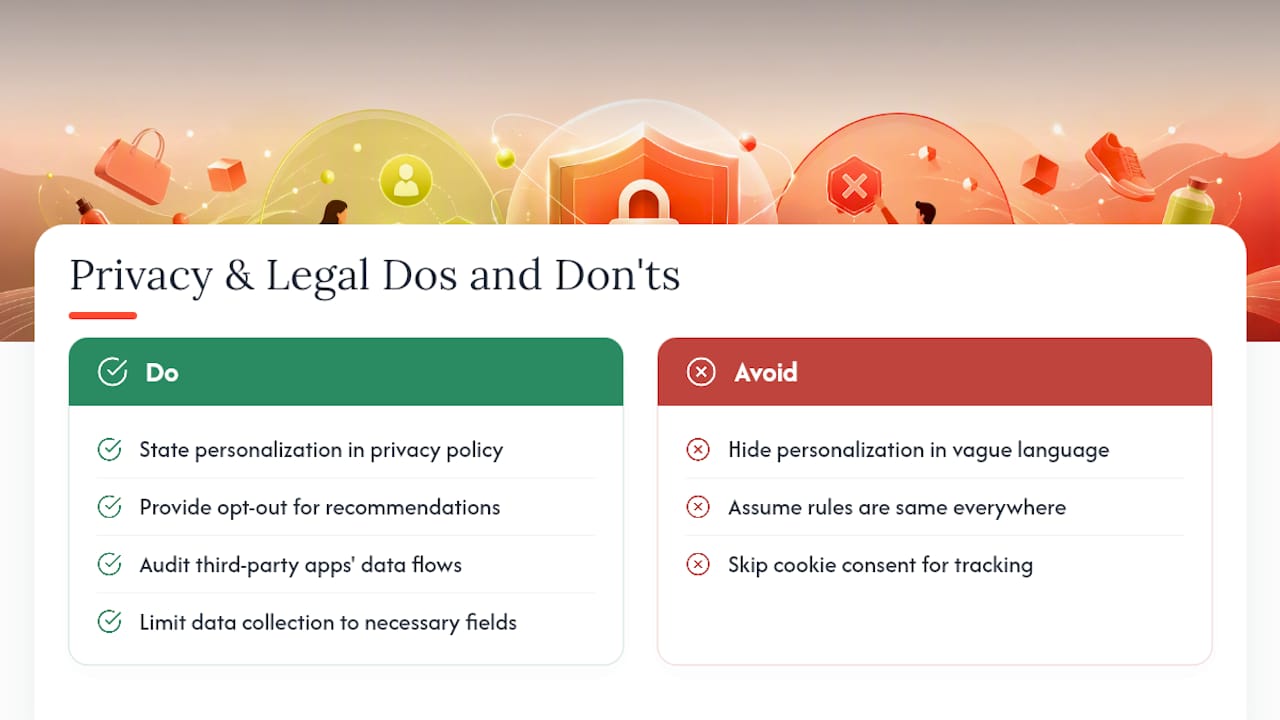
Cross-sell personalization runs on customer data, which means it runs into the same privacy rules governing any other use of that data. If your store serves customers in the EU or UK, GDPR requires a lawful basis for processing behavioral and purchase data used to generate personalized recommendations, and consent requirements apply differently depending on whether you’re using first-party browsing data versus third-party tracking. California’s CCPA and similar state laws impose comparable obligations for US customers, including disclosure and opt-out rights.
Practically, that means your privacy policy needs to describe recommendation personalization plainly, not bury it in generic language about “improving your experience.” If you’re using third-party apps to power recommendations, check what data those apps collect and where it’s processed, since you’re still responsible for how customer data flows once it leaves your storefront. Cookie consent banners need to cover any tracking used to personalize recommendations, not just advertising pixels.
None of this should scare you away from personalization. It should just push you toward transparency: tell customers what data drives their recommendations, give them a way to opt out, and don’t collect more than you actually use. Shopify merchants operating internationally have the added complexity of varying rules by region, so if your customer base spans multiple countries, a quick conversation with legal counsel about your specific data flows is worth more than guessing.
Author Perspective: Your Next 7 Days
Start with your 10 top-selling SKUs. Enable native recommendations store-wide, then manually configure complementary pairings for just those ten products in Search & Discovery. That’s an afternoon of work, not a project.
Next, add one quick-add cross-sell to your cart drawer or cart page. Don’t touch anything else. Watch add-to-cart rate on that single placement for one full week before drawing conclusions.
If the numbers stay flat and you suspect the problem is deeper than placement, that’s the signal to run a proper audit rather than keep guessing. A managed pilot exists for exactly that situation, when the DIY path has plateaued and you need someone actively tuning relevance instead of leaving it on autopilot.
— Barikreativa
Get a Managed Recommendation Setup Without the Guesswork
Indexa is the alternative to spending weeks configuring and re-tuning Shopify’s native tools yourself. It’s a fully managed AI search and discovery service built specifically for Shopify stores, combining typo-tolerant, semantic search with recommendation tuning that keeps adjusting based on how your actual shoppers behave, not a one-time setup you configure once and forget.

Activation takes minutes, and the service keeps refining relevance in the background while you focus on merchandising decisions. Merchants keep ownership of their data throughout, and billing is structured as a monthly retainer without per-request fees.
If you’re not sure whether your current setup is leaving revenue on the table, start with the free Shopify search audit. It’s the fastest way to see exactly where your search and recommendation experience is losing shoppers before they buy. Merchants who want to see results firsthand can also look at the 30-day pilot as a low-commitment way to test managed tuning against what you’re running today.
Sources
- Product recommendations — Shopify Help Center
- How to Add Product Recommendations to a Shopify Cart Drawer — F22 Labs
- Shopify In-Cart Recommendations: Setup, Code & AOV Data — Oxify
FAQ
What Is the Best Cross-Sell App for Shopify?
There’s no single best app for every store. Native Shopify recommendations plus Search & Discovery complementary pairings cover most merchants for free, while third-party apps add bundle logic and segmentation at the cost of extra page weight. A managed service like Indexa is worth considering when you want ongoing tuning without managing the setup yourself.
Is Shopify Still Worth It in 2026?
Shopify remains one of the leading platforms for merchants who want built-in tools like the Product Recommendations API, Search & Discovery, and a large app ecosystem without building infrastructure from scratch. Whether it’s worth it depends more on your business model and volume than the platform itself, since the tools scale from a single-product store to a large multi-market catalog.
What Is the Most Profitable Product to Sell on Shopify?
Profitability depends far more on margin structure, supplier relationships, and shipping costs than on any single “best” product category. Complementary items with strong margins, like accessories or consumables tied to a core product, tend to make particularly effective cross-sells because customers already understand why they need them.
How Much Does Shopify Take From a $20 Sale?
Shopify’s transaction fees depend on your plan and payment method, and they change periodically, so check Shopify’s own current pricing page for the exact rate on your plan rather than relying on a fixed figure. What doesn’t change is that a well-placed cross-sell recouping even a few extra dollars per order does far more for your margin than shaving fractions of a percent off transaction fees.
How Do I Know if My Cross-Sell Recommendations Are Working?
Track add-to-cart rate on recommended items specifically, not just overall AOV, since AOV can shift for unrelated reasons. An add-to-cart rate between 3% and 8% is a solid benchmark for most product categories, with necessary add-ons often performing above that range.
Recommended
Make discovery work harder.
See what your Shopify search could do better with a free, hands-on audit.
Get your free search audit