100–300 Queries First: Semantic vs Keyword Search for Shopify
Choose BM25, semantic, or hybrid for your Shopify store. Label 100–300 real queries and measure NDCG@10, or run Indexa's managed hybrid to test impact.

100–300 Queries First: Semantic vs Keyword Search for Shopify
For most production systems, the answer is neither alone. Run BM25 for anything with an exact identifier (SKUs, error codes, order numbers) and semantic retrieval for conversational or paraphrased queries, then fuse both with reciprocal rank fusion. Precision favors keyword matching; recall favors meaning based retrieval. If you only have time to build one thing this quarter, build the eval set first (see the checklist below), because that’s what tells you whether semantic is even earning its infrastructure cost.
TL;DR:
- Keyword search remains ideal for exact identifiers like SKUs, error codes, and legal citations due to its high precision and low infrastructure costs.
- Semantic search offers better recall for natural language, paraphrases, and multilingual queries but introduces operational costs from embedding pipelines and vector management.
- Hybrid search combines both approaches, proving most effective for diverse query types common in e-commerce and enterprise settings, with evaluation essential before full deployment.
- Most production systems start with a lexical index, add semantic retrieval based on evidence from logs, and fuse results with reciprocal rank fusion for optimal relevance.
- Managed solutions like Indexa allow merchants to implement hybrid search without extensive engineering, enabling quick setup, continuous tuning, and performance monitoring.
Table of Contents
- Semantic Search Explained: What It Actually Does
- Keyword Search Explained: Why BM25 Still Runs the Internet
- How Keyword and Semantic Search Work Under the Hood
- Semantic vs Lexical Search: Comparing the Trade-Offs That Matter
- When to Use Keyword, Semantic, or Both
- What Hybrid Search Actually Costs to Run
- What Practitioners Actually Recommend
- Historical Evolution of Search Technologies
- Where Semantic Search Still Struggles
- How Search Relevance Changes the Shopper Experience
- Tools and Frameworks Behind Modern Search
- Industries Semantic Search Has Reshaped Most
- What the Evidence Actually Supports
- Get Hybrid Search Without Building the Infrastructure
- Sources
- FAQ
Semantic Search Explained: What It Actually Does
Semantic search retrieves results based on meaning rather than exact word overlap. It converts text into embeddings, numeric vectors that place similar concepts near each other in space, then finds the nearest matches to a query vector using approximate nearest neighbor (ANN) search inside a vector database.
The pipeline works in three stages. A model encodes documents into vectors during indexing. The same model encodes the incoming query at search time. An ANN algorithm then scans the vector index for the closest matches, ranking results by cosine similarity or dot product rather than word overlap. This is the same underlying idea behind Google Cloud’s description of how modern web search uses natural language processing and machine learning to interpret intent and context instead of relying solely on keyword matching.
That architecture gives semantic search real advantages over lexical matching alone:
- Paraphrase tolerance: a query for “shoes that won’t hurt after standing all day” can match a product described as “cushioned support insoles.”
- Multilingual retrieval: a well trained multilingual embedding model can match a French query against English-language product copy.
- Better recall on natural-language queries: long, conversational searches (“gift for someone who just started running”) tend to outperform simple keyword matching, since no single keyword captures the intent.
- Strong foundation for retrieval-augmented generation: semantic retrieval is the usual backbone for RAG systems because it pulls conceptually relevant chunks rather than exact-string matches to ground an LLM’s answer.
The tradeoff is that meaning based matching can drift. A vector that’s “close enough” isn’t always correct, which becomes a real problem the moment your catalog is full of near-identical part numbers.
Keyword Search Explained: Why BM25 Still Runs the Internet
Keyword search, also called lexical search, retrieves documents by matching tokens against an inverted index, a data structure that maps every word to the list of documents containing it. No meaning, no vectors. Just term overlap, scored by a formula.
The dominant scoring function is BM25 (an evolution of TF-IDF), and it weighs three things: how often a term appears in a document (term frequency), how rare that term is across the whole collection (inverse document frequency), and how long the document is, so a 50-word product description isn’t unfairly buried by a 5,000-word one (length normalization). A query for “wireless mechanical keyboard” scores documents highest when they contain those exact tokens, weighted by how unusual and how densely those words appear.
This approach has stayed dominant in production systems for a reason:
- Exact-match precision: BM25 remains the best choice for product SKUs, error codes, legal citations, and anything else where the query is the identifier.
- Deterministic, auditable results: the same query returns the same ranking every time, and you can point to exactly why a document scored the way it did.
- Very low infrastructure cost: BM25 runs in milliseconds on commodity hardware with no embedding model, no GPU, and no vector index to maintain.
- No training data required: it works out of the box on any corpus, in any domain, on day one.
The weakness is the vocabulary gap. If a shopper searches “warm winter coat” and your product is tagged “insulated parka,” BM25 finds nothing, because it has no concept of synonymy.
How Keyword and Semantic Search Work Under the Hood
Understanding the two pipelines side by side makes the failure modes obvious.
Keyword search: tokenize the query, look up each token in the inverted index, score every matching document with BM25, sort by score. It’s fast, transparent, and entirely rule-based.
Semantic search: encode the query into an embedding, search a vector index for the nearest neighbors using ANN algorithms like HNSW, score by vector similarity, sort. It’s flexible but opaque; you can’t easily explain why document A scored 0.87 and document B scored 0.85.
Each pipeline breaks in predictable ways:
- Semantic misranks identifiers: a query for “error code 404” can retrieve documents about “missing page problems” or unrelated numeric strings, because the embedding treats “404” as a loose concept rather than a literal token.
- Keyword misses the vocabulary gap: “affordable laptop” won’t match a product titled “budget-friendly notebook” unless someone manually maps that synonym.
- Chunking breaks long documents for both, but especially semantic: a 20-page manual embedded as one vector loses the specific detail on page 14, so most systems split documents into smaller chunks, which introduces its own tuning problem.
Semantic retrieval also introduces new operational costs that a pure keyword system never has to worry about: embedding pipelines, vector storage, and latency from the ANN search step itself.
Semantic vs Lexical Search: Comparing the Trade-Offs That Matter
The right architecture depends on which of these five dimensions your product actually needs to win on.
| Dimension | Keyword (BM25) | Semantic (embeddings) |
|---|---|---|
| Precision vs. recall | High precision on exact match, weak recall on paraphrase | High recall on paraphrase and intent, weaker precision on identifiers |
| Infrastructure cost & latency | Millisecond queries, minimal storage, no GPU | Adds embedding costs, vector storage, and ANN search latency |
| Explainability / auditability | Fully transparent scoring, easy to debug | Harder to explain why two vectors scored close together |
| Best for | Identifiers: SKUs, error codes, legal citations, code search | Intent queries: conversational search, support questions, discovery |
| Operational complexity | Low; runs on commodity infrastructure | Higher; requires model hosting, fine-tuning, and index maintenance |
A shopper searching an exact model number wants precision. A shopper describing what they want in their own words wants recall. Trying to force one architecture to serve both jobs is where most search relevance complaints come from.
On cost and latency: BM25 queries typically run in single-digit milliseconds with negligible storage overhead. Hybrid stacks incur both sets of costs, the lexical index plus embedding API calls, vector storage, and fusion latency, which is why teams should confirm semantic actually moves the metric before committing to it permanently.
Pro Tip: Before you build anything, pull your last 30 days of search logs and hand-tag 100 queries as “identifier-style” or “conversational.” If more than 60% are identifier-style, BM25 alone might already be doing most of the job.
Quick heuristics: pick BM25 when queries look like codes or names; pick semantic when queries read like sentences; pick hybrid when your traffic is a mix of both, which it almost always is.
When to Use Keyword, Semantic, or Both
Certain workloads have an obvious winner. Others need the blend.
Favor BM25 for: application log search, SKU and part-number lookup, code search across a repository, legal and compliance document retrieval where exact phrasing carries legal weight.
Favor semantic for: retrieval-augmented generation pipelines, customer support question-answering, product discovery from vague or descriptive queries, and cross-language search where the shopper’s words won’t literally appear in the catalog.
Hybrid becomes necessary the moment your query distribution is mixed, which describes most e-commerce and enterprise search traffic. A shopper might search “SKU-88213” in one session and “cozy sweater for cold offices” in the next. No single retriever serves both well.
To decide with evidence instead of guesswork, follow this sequence:
- Build a labeled evaluation set of 100 to 300 real queries pulled from your own logs, tagged with the documents that should rank.
- Measure both retrievers against that set using NDCG@10, MRR, and recall@k, the standard benchmarks used across BEIR and MS MARCO evaluations.
- Log which retriever actually produced the result the user clicked, per query, so you can see real contribution instead of assuming it.
- Add reciprocal rank fusion once you have both retrievers scored, then apply a reranker only if the fused ranking still misses on high-value queries.
What Hybrid Search Actually Costs to Run
Running BM25 alone costs almost nothing: milliseconds per query, small index footprint, no external API calls. Layering in semantic retrieval adds three cost centers: embedding generation (per document at index time, per query at search time), vector storage that scales with corpus size, and fusion or reranking latency on top of both retrievers’ response times.
Indexing cadence differs too. Keyword indexes update near-instantly since it’s just token insertion. Embedding pipelines need re-encoding whenever content changes meaningfully, which adds lag if your catalog updates frequently.
Practical tactics that reduce pain:
- Chunk long documents into passage-sized pieces (roughly 200 to 500 tokens) rather than embedding whole pages, so retrieval returns the specific relevant section.
- Enrich chunks with metadata (category, price band, brand) so filtering happens before the expensive vector search, not after.
- Fine-tune or adapt embeddings on your own domain vocabulary if you operate in a specialized field where general-purpose models miss context.
- Instrument click logs by retriever source; if semantic results rarely get clicked over lexical ones for a given query type, that’s your signal to simplify.
What Practitioners Actually Recommend
The sequence that holds up in production: start with a lexical index because it’s cheap and immediately useful, add dense retrieval once you have evidence of a vocabulary gap, fuse both with RRF rather than trying to calibrate scores manually, and only add a cross-encoder reranker if the fused results still miss on your highest-value query types. RRF is deliberately low-effort because it merges rankings without needing the two retrievers’ scores to be on the same scale.
For Shopify merchants specifically, this stack is exactly what Indexa’s query understanding layer is built around, interpreting shopper phrasing while still respecting exact product identifiers.
Why this matters for retailers rather than search engineers: most stores don’t have a data science team to build and maintain an eval set, tune embeddings, and monitor retriever contribution every month.
- The service activates without setup work on the merchant’s side and begins tuning within minutes of connecting a store.
- Merchants have reported recoverable revenue from search failures that a hybrid, typo-tolerant setup catches automatically.
[case studies demonstrating Indexa’s positive impact on Shopify stores] [testimonials from Shopify retailers highlighting Indexa’s benefits]
Historical Evolution of Search Technologies
Search technology spent decades built almost entirely on lexical matching. Early information retrieval systems in the 1970s and 1980s relied on Boolean keyword matching, then TF-IDF scoring, then BM25, which became the workhorse behind most search engines and enterprise systems through the 2000s. Google’s original PageRank algorithm still leaned heavily on keyword relevance signals combined with link structure.
The shift began in earnest with the rise of word embeddings in the mid-2010s, techniques like Word2Vec and GloVe that first let machines represent word meaning as vectors. Transformer models, introduced in 2017, made that representation dramatically more powerful by capturing context, so the same word could carry different meaning depending on the sentence around it. That breakthrough enabled the dense, contextual embeddings that power today’s vector search.
Google’s own systems reflect this transition. Google Search now applies natural language processing and machine learning to interpret intent and relationships behind a query rather than matching keywords alone, a shift that took roughly a decade of model development to reach production maturity at that scale.
The practical lesson from that history: semantic search didn’t replace keyword search, it layered on top of it. Every major production system still runs lexical matching somewhere in its pipeline, because identifiers, codes, and exact phrases never stopped mattering. The evolution was additive, not a replacement.
Where Semantic Search Still Struggles
Semantic search fails in specific, recurring ways once you push past demo-quality examples into real production traffic.
Ambiguous queries are the clearest problem. A search for “apple” could mean the fruit, the company, or a record label, and an embedding model has no built-in way to disambiguate without additional context, like the user’s browsing history or the surrounding catalog. Keyword search has the exact same ambiguity problem, but at least it’s transparent about it, since you can see literally which documents matched the token.
Domain adaptation is the second major limitation. A general-purpose embedding model trained on broad web text won’t understand that “cold roll” means something specific in a metal fabrication catalog, or that a “widow maker” is furniture industry slang for an unstable saw blade. Models need fine-tuning or the corpus needs metadata enrichment to close that gap, and skipping that step is the single most common reason a semantic search rollout underperforms its pilot results.
A third, subtler failure mode: semantically plausible but factually wrong matches. A query about a specific product’s return policy might retrieve a passage about a similar product’s return policy, because the embeddings are close in vector space even though the actual answer is wrong. This is why plausible but incorrect retrieval is treated as a known anti-pattern rather than an edge case, and why reranking and filtering matter as much as the initial retrieval step.
How Search Relevance Changes the Shopper Experience
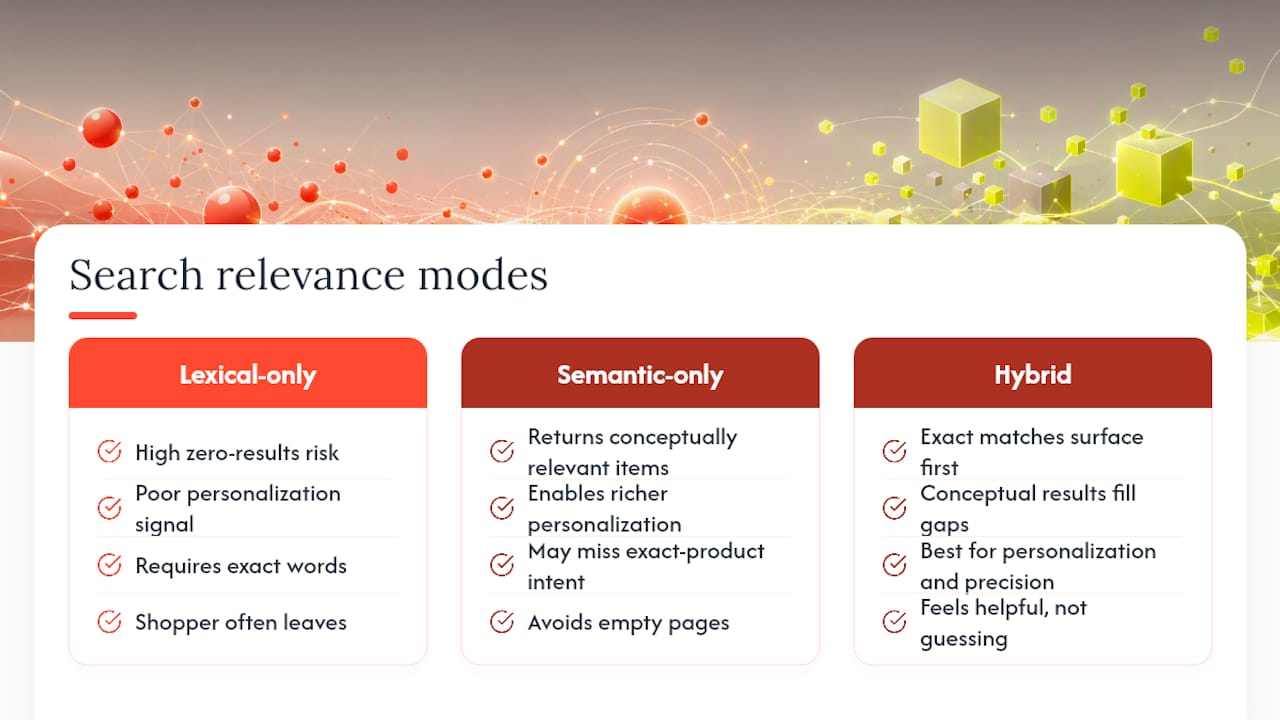
The practical difference between keyword and semantic search shows up fastest in the moment a search returns zero results. A lexical-only system tells a shopper searching “cozy fall sweater” that nothing matches, even when the store has twelve relevant sweaters tagged differently. That’s not a small UX problem. A zero-results page is one of the highest-intent moments in a shopping session, and it’s also one of the most common points where a shopper simply leaves.
Semantic retrieval changes that outcome by matching the intent behind the phrase rather than requiring the literal words to exist in the product title. The shopper gets relevant sweaters instead of an empty page, and the store keeps the sale it would have otherwise lost to a search box that couldn’t understand plain language.
Personalization compounds this further. Once a system understands meaning rather than just tokens, it becomes far easier to weight results by a shopper’s browsing history, past purchases, or stated preferences, because you’re ranking by conceptual closeness, not just keyword overlap. That’s a much richer signal to personalize against.
The flip side matters too: a purely semantic experience without any lexical safety net can frustrate shoppers who search for an exact product name or model number and get a page of “similar” items instead of the one they wanted. The best experience blends both: exact matches surface immediately when they exist, and conceptually relevant results fill in around them when they don’t. That blend is what separates a search bar that feels helpful from one that feels like it’s guessing.
Tools and Frameworks Behind Modern Search
Building either system from scratch means choosing from a fairly established set of building blocks.
For keyword search, Elasticsearch and OpenSearch remain the dominant open-source engines, both built around BM25 scoring and inverted indexes. Apache Solr still runs in plenty of enterprise environments for the same reason.
For semantic search, the stack splits into three layers. Embedding models (open models like the Sentence-Transformers family, or hosted APIs from major model providers) convert text into vectors. Vector databases, including Pinecone, Weaviate, Milvus, and Redis’s own vector search capabilities, store and query those vectors at scale using ANN algorithms like HNSW. Orchestration frameworks like LangChain and LlamaIndex stitch embeddings, vector storage, and retrieval logic together, especially for RAG applications.
Hybrid search increasingly comes built into the infrastructure itself rather than requiring separate systems bolted together. Redis, for example, supports combining lexical and vector search natively, which removes one integration headache that used to require custom fusion code.
For e-commerce specifically, most stores never touch this infrastructure directly. Platforms like Indexa handle the embedding pipeline, vector storage, fusion, and reranking as a managed layer, so a merchant gets the hybrid outcome without hiring a search engineering team to assemble the underlying pieces.
Industries Semantic Search Has Reshaped Most
A handful of industries have felt this shift more than others.
E-commerce sits at the top of the list. Product discovery is fundamentally a language problem: shoppers describe what they want in their own words, rarely using the exact terms a merchandiser chose for a product title. Semantic search closes that gap directly, which is why it’s become a competitive differentiator rather than a nice-to-have feature for online retail.
Customer support and knowledge-base search is another major case. Support queries are almost always conversational (“why won’t my order confirmation email arrive”) rather than keyword-shaped, making semantic retrieval a natural fit for surfacing the right help article or triggering a RAG-based chatbot response.
Legal and healthcare research present a more complicated picture. Both fields benefit from semantic search’s ability to surface conceptually related case law or clinical literature that doesn’t share exact terminology. But both also depend heavily on precise, auditable citations, which keeps keyword search firmly in the loop for anything involving exact statutory language or dosage codes.
Enterprise knowledge management, internal documentation, and code search round out the list, each combining a genuine need for meaning-based retrieval with a persistent requirement for exact-match precision on identifiers, function names, and ticket numbers.
What the Evidence Actually Supports
The industry conversation around semantic search versus keyword strategy has a bad habit of framing this as a replacement story, old technology giving way to new. That framing doesn’t hold up against the benchmarks. Hybrid pipelines combining BM25 and dense retrieval routinely outperform either retriever alone on NDCG@10 across established evaluation sets, which means the “semantic wins” narrative is really an argument for addition, not substitution.
Where conventional advice falls short is in treating retriever choice as an architecture decision made once, up front. It’s not. It’s a measurement problem that should be revisited as query patterns shift. A store that skews toward SKU lookups during a sale event and toward descriptive discovery during browsing season needs both retrievers doing real work, not a single model chosen at launch and never audited again.
If there’s one priority worth acting on before any other, it’s this: instrument your search logs to show which retriever actually produced the clicked result. Everything else, chunking strategy, fine-tuning, reranker selection, is a tuning decision. That instrumentation is the only thing that tells you whether your current setup is working or just running.
— Barikreativa
Get Hybrid Search Without Building the Infrastructure
Everything above assumes you have the engineering time to build an eval set, wire up a vector database, and monitor retriever contribution every month. Most Shopify merchants don’t, and shouldn’t have to. Indexa is a fully managed alternative: it runs typo-tolerant, semantic, and lexical search together behind one connection to your store, tuned continuously against your real shopper queries instead of a generic benchmark.

There’s no setup required on your end, and the merchandising, synonym mapping, and query understanding layers activate within minutes of connecting your catalog. If you want to see where your current search is losing sales before committing to anything, start with the free search audit, then try the 30-day pilot to see the hybrid approach running against your own store’s traffic.
Sources
- Google Cloud
- Redis: Semantic search vs. keyword search
- InstitutePM: Semantic search vs keyword search
- Unstructured: Semantic vs keyword search
FAQ
What are the four types of search?
Search is commonly grouped into keyword (lexical) search, semantic search, vector search (a technical implementation of semantic matching), and hybrid search, which combines lexical and semantic retrieval. Hybrid is what most production systems run once traffic includes both identifier-style and conversational queries.
Are keywords still relevant for SEO and search strategy?
Yes. Exact-match keyword signals still drive precision for identifiers, product names, and specific terms, and BM25 remains the standard scoring method for that kind of query even in systems that also run semantic retrieval. Ignoring keyword strategy in favor of semantics alone tends to hurt precision on exactly the queries that matter most for conversion.
What is an example of semantic search?
A shopper searching “warm jacket for hiking in the rain” and getting matched to a product titled “waterproof insulated trail coat” is semantic search in action. No shared keywords exist between the query and the title, but the embedding models recognize the underlying intent, a capability Indexa’s query understanding applies specifically to Shopify product catalogs.
Is Google a semantic search engine?
Largely, yes. Google Search applies natural language processing and machine learning to interpret the intent and context behind a query rather than matching keywords alone, though it still uses lexical signals as part of its overall ranking system rather than relying on semantics exclusively.
How much does Indexa cost for a Shopify store?
Indexa runs on a flat monthly retainer plus a one-time setup fee, with current pricing available on the pricing page. Merchants can start with a free audit before committing to a plan.
Recommended
Make discovery work harder.
See what your Shopify search could do better with a free, hands-on audit.
Get your free search audit